Creators, brands and agencies who repeat the same research steps every day
TikTok workflow automation: act on breakouts, new posts and schedules
By Michael, Founder, FYPNow · Updated 2026-09-25
Automations is a no-code TikTok workflow builder inside FYP Now. Pick a trigger (a creator you track breaks out, your Viral Content Agent finds new videos, a schedule), then connect the steps: analyze the video, write a script, make Slideshow Studio slideshows, send them to your TikTok drafts, and tell Slack, Discord, a webhook or your inbox.
Try it on your own account
7-day free trial on Starter, then $49/mo. Cancel before it ends and you are not charged.
What this replaces
- •You check breakouts every morning, then paste the same link into analysis, then into a script, then into Slack.
- •A video from a creator you track breaks out at 2am, and nobody looks at it until lunch.
- •Your team wants the same numbers every Monday, and someone has to remember to send them.
- •Making slideshows from what is working means the same handful of clicks for every topic.
How it works
- 1Open Automations and start from one of six templates or a blank canvas.
- 2Pick a trigger: a breakout from a creator you track, new videos from an Agent, a tracked creator posting, an analysis finishing, a schedule or Run now.
- 3Add steps from the list and connect them. Each step can use what earlier steps produced, like the video link or the hook type.
- 4Press Run now to test it once, check each step’s result, then turn it on.
- 5Every run is listed with what each step did. If a plan limit is hit, the automation pauses and resumes by itself.
TikTok workflow automation ideas you can build today
Each idea is a real chain from the builder, start to finish. Open a blank canvas, add the steps in this order and pick your own channel, niche or account.
Brands and creators watching competitors
Only the breakouts that reached a real audience
- Breakout detected · 5x or more
- Filter · views is at least 100,000
- Slack message · #competitors
A 5x on an account that usually gets 2,000 views is noise. Adding a 100,000-view floor means Slack only pings for videos a real audience saw.
Content teams building a hook swipe file
Sort competitor posts by hook type
- Tracked creator posted · the competitors you pick
- Analyze video
- Branch · hook type is Curiosity gap
- YesSlack message · with the hook text
- NoSave to Library
The hooks you want to study reach Slack minutes after posting, and every other post still lands in your Library for later.
Agencies running research for several clients
One Slack channel per client
- Agent found new videos · only the client’s Agent
- For each · each new video, up to 5
- Filter · multiplier is at least 5
- Slack message · #client-acme
Copy it once per client. Each client channel gets only its own niche’s 5x+ videos, and nobody pastes links between workspaces.
Creators posting on both TikTok and Shorts
TikTok and YouTube Shorts, split by platform
- Agent found new videos
- For each · each new video, up to 5
- Branch · platform is YouTube Shorts
- YesSlack message · #shorts
- NoSlack message · #tiktok
One Agent watches both platforms. Shorts go to the channel your YouTube editor reads, TikToks to yours.
Creators and brands scouting new accounts
Start tracking whoever just broke out in your niche
- Agent found new videos
- Filter · top new video: platform is TikTok, multiplier is at least 20
- Track creator · that video’s creator
- Slack message
A 20x TikTok from an account you don’t track yet is worth watching. Once tracked, their next breakouts and posts can start your other automations.
Social teams with a weekly check-in
Monday scorecard for the whole team
- On a schedule · Mondays 9:00, your time zone
- Growth scorecard · last 30 days
- Email · you and your teammates
Everyone walks into the Monday meeting with the same four numbers, and nobody has to remember to send them.
Teams that keep research in a spreadsheet
Every analysis logged to Notion or Google Sheets
- Analysis finished · TikTok or YouTube Shorts
- Webhook · your n8n or Make workflow
Point the webhook at an n8n or Make workflow that adds a row. Your swipe file fills itself every time anyone on the team analyzes a video.
Creators who make carousels with AI images
Breakout to a carousel script for your AI image generator
- Breakout detected · 10x or more
- Analyze video
- Generate script · carousel, for your account
- Webhook · n8n, Make or your own server
FYP Now writes the slide-by-slide script; the webhook hands it to n8n, Make or your own server, which can call your AI image generator and save the images wherever you like.
Six templates, one click to start
A template opens as a normal automation you can edit. Pick the Slack channel, niche or TikTok account it asks for, then save it.
Brands and creators
Breakout from a tracked creator → analyze → script → Slack
- Breakout detected · 10x or more
- Analyze video
- Generate script · video, for your account
- Slack message
A competitor’s breakout reaches Slack already analyzed, with a script for your account waiting in FYP Now.
Creator teams and communities on Discord
Tracked creator posted → analyze → Library → Discord
- Tracked creator posted
- Analyze video
- Save to Library
- Discord message · with the hook type
Every new post from the creators you track is broken down and filed, without anyone pasting a link.
Solo creators
Every Monday 9:00 → growth scorecard → email me
- On a schedule · Mondays 9:00
- Growth scorecard · last 30 days
- Email · you
Your own numbers against your niche’s benchmarks, in your inbox before the week starts.
Slideshow creators
Breakout (10x or more) → carousel script → Studio → TikTok drafts
- Breakout detected · 10x or more
- Generate script · carousel
- Slideshow from script
- Send to TikTok drafts
A topic that just proved itself becomes a slideshow in your TikTok drafts. You review it and publish it yourself in the TikTok app.
Creators who post slideshows every day
Daily 8:00 → 3 Studio slideshows → TikTok drafts
- On a schedule · daily 8:00
- Make Studio slideshows · 3, topic from your niche
- Send to TikTok drafts
Three slideshows built from your own photos are waiting in your drafts every morning.
Agencies and research teams
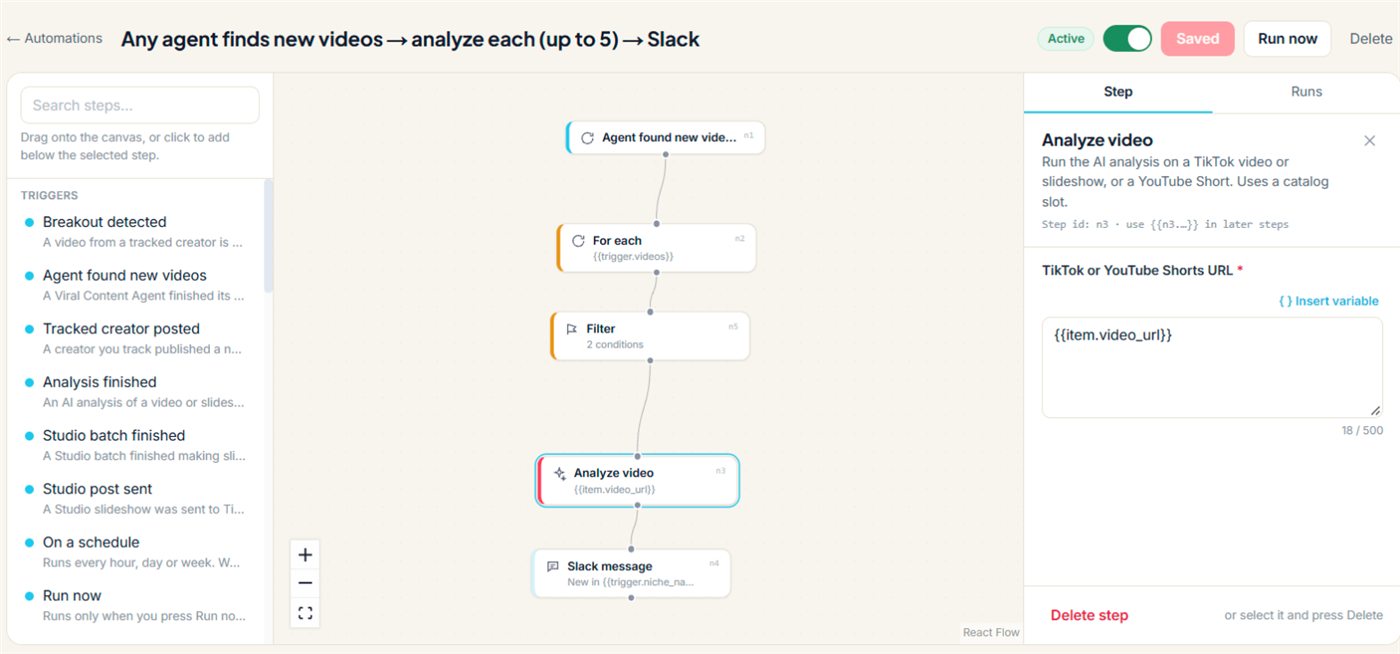
Any agent finds new videos → analyze each (up to 5) → Slack
- Agent found new videos
- For each · up to 5
- Analyze video
- Slack message · with the hook type
The best new videos in your niche, TikTok or Shorts, reach Slack analyzed, hook type included.
Triggers: what starts a run
Every automation has exactly one trigger. Triggers need no integration, and each one hands its data to the steps below it.
Breakout detected
A video from a creator you track gets far more views than that creator usually does. Narrow it to certain creators or formats with a Filter step.
- •Setting: minimum multiplier, 5x, 10x or 20x
- •Carries: link, views, typical views, multiplier, creator, format (video, photo carousel or slideshow)
Agent found new videos
One of your Viral Content Agents finished a refresh and found new videos in its niche, TikTok or YouTube Shorts.
- •Setting: only these niches
- •Carries: the top 5 new videos by virality, each with views, multiplier, platform, creator and link, plus the niche name and how many videos are new
Tracked creator posted
A creator you track has a new video up.
- •Setting: only these creators
- •Carries: caption, link, views, likes, format, posting time
Analysis finished
An AI analysis finished on a TikTok video, a TikTok slideshow or a YouTube Short, whether you started it or another automation did.
- •Setting: platform, TikTok or YouTube Shorts
- •Carries: hook type, content type, niche, highlights, link
Studio batch finished
A Slideshow Studio batch finished making slideshows.
- •Setting: only completed, partly completed or failed batches
- •Carries: the slideshow IDs, how many were made, how many failed
Studio post sent
A Studio slideshow reached the TikTok drafts of an account you connected, or failed to.
- •Setting: only certain results
- •Carries: slideshow, TikTok account, result
On a schedule
Every hour, every day at a set time, or on the days of the week you choose.
- •Settings: minute, hour, days, time zone
Run now
Runs only when you press Run now, with an optional default topic. Handy for one-off batches.
- •Setting: default topic
Filters and logic: act only on what matters
Virality in FYP Now is the multiplier: a video’s views divided by the creator’s typical views. A video at 240,000 views from a creator whose videos typically get 20,000 is at 12x, so it clears a 10x breakout trigger and misses a 20x one.
Filter
Continue only when the conditions match. Use up to 10 conditions on any field from the trigger or an earlier step, and match all of them or any of them.
- •Examples:
Views is at least 100,000,Multiplier is at least 5,Platform is YouTube Shorts,Format is Photo carousel,Username is one of @rival, @otherrival - •Operators: is, is not, is more than, is at least, is less than, is at most, contains, doesn’t contain, is one of, has a value
Branch
Send each run down a Yes path or a No path, using the same conditions as Filter.
- •Example:
Hook type is Curiosity gapgoes to Slack, everything else to your Library
For each
Run the next steps once per item in a list, up to 25 items, such as each new video an Agent found. One For each per automation, no loops inside loops.
- •Each item’s fields are variables:
{{item.username}},{{item.multiplier}},{{item.video_url}}
Wait
Pause between 1 minute and 24 hours before the next step, for example to post the Slack recap after the morning rush.
Steps: what the automation does
The same research and actions as the dashboard. Steps that analyze, write or make something use the same plan allowances as doing it by hand.
Find videos and data
Read your workspace’s research without opening a tab.
- •Search analyzed videos: by creator, views, date or format
- •Find similar videos: up to 25 videos like one you pick
- •Niche videos: an Agent’s top videos, ranked by multiplier
- •Niche stats: typical views, breakouts, top posts, hashtags, sounds and creators
- •Recent breakouts, Creator report, Growth scorecard, Get video analysis
Analyze video
The full AI breakdown of a TikTok video, a TikTok slideshow or a YouTube Shorts link: hook type, hook text, content type and niche. Uses a catalog slot.
Generate script
A video or carousel script for your own account, based on any analyzed video, with optional notes. Uses a script credit.
Search viral trends
Breakout videos for a hashtag over the last 7, 14 or 30 days. Uses a trend search.
Save to Library and Track creator
File a video in your workspace Library, or start tracking a TikTok creator (outside a For each).
Slideshow Studio
Make Studio slideshows (up to 10 per batch, from a topic, your niche or a creator’s format, built from your own photos), Slideshow from script (turns a carousel script into a slideshow) and Send to TikTok drafts (up to 5 a day, to an account you connected).
- •Nothing is published: you review the drafts and post them yourself in the TikTok app.
Destinations: where the results go
Messages are your own text plus variables from the trigger and earlier steps. Click Insert variable to drop in {{trigger.multiplier}}, {{item.username}} or {{n3.hook_type}} (the hook type from step 3).
Slack message
Post to a Slack channel you connected once in Settings → Integrations.
Discord message
Post to a Discord channel, connected the same way.
Webhook
A signed JSON POST to your own URL, so any tool that accepts a webhook can take it from there: n8n, Make or your own server. Run any step’s output through whatever you like, including AI image generation, or add a row to Notion or Google Sheets.
- •One-way: FYP Now sends the message and doesn’t read the reply.
- •Slideshow Studio, by contrast, builds slideshows from your own photos and sends them to your TikTok drafts.
Email you or up to 20 members of your workspace, with your own subject and message. Outside addresses aren’t allowed.
Safety and limits
Automations are included on every paid plan. Runs reset on your billing day.
| Per workspace | Creator | Starter | Pro | Business |
|---|---|---|---|---|
| Automations turned on | 1 | 5 | 25 | 100 |
| Runs a month | 500 | 2,000 | 10,000 | 50,000 |
- Never posts to TikTok. Studio steps only send slideshows to your drafts, and you publish from the TikTok app.
- A run counts once it starts a real step. Runs stopped by a trigger setting or a Filter don’t count.
- Each automation runs at most 60 times an hour.
- An automation never re-triggers itself, and chains between automations stop after a few hops.
- Run now tests on your newest real event that matches the trigger’s settings, never another niche’s or creator’s (an example event only when the trigger has no settings to match).
- If a step hits a plan limit, the automation pauses and starts again by itself when there’s room: the allowance resets, you make room or you upgrade.
- After five failed runs in a row it pauses and emails you which step failed.
What you get
Which plan you need
Automations are included on every paid plan. Each workspace can have Creator 1 automation turned on with 500 runs a month, Starter 5 automations with 2,000 runs, Pro 25 automations with 10,000 runs and Business 100 automations with 50,000 runs. Runs reset on your billing day.
Questions
What can start an automation?
A breakout from a creator you track (5x, 10x or 20x+ their usual views), a Viral Content Agent finding new videos, a tracked creator posting, an analysis finishing, a Slideshow Studio batch finishing, a Studio slideshow being sent to TikTok, a schedule (hourly, daily or weekly, in your time zone), or you pressing Run now.
Which templates can I start from?
Six, each ready to edit: Breakout from a tracked creator → analyze → script → Slack; Tracked creator posted → analyze → Library → Discord; Every Monday 9:00 → growth scorecard → email me; Breakout (10x or more) → carousel script → Studio → TikTok drafts; Daily 8:00 → 3 Studio slideshows → TikTok drafts; Any agent finds new videos → analyze each (up to 5) → Slack. Or start from a blank canvas.
Can I filter by virality?
Yes. Virality is the multiplier: a video’s views divided by the creator’s typical views. Set a Breakout detected trigger to 5x, 10x or 20x, or add a Filter step such as “Multiplier is at least 5”, and pair it with “Views is at least 100,000” so only videos a real audience saw get through.
Will it post on my TikTok account?
No. Automations never publish anything. Studio steps can send slideshows to the TikTok drafts of an account you connected, and you review and publish them yourself in the TikTok app.
Can I send results to my own tools?
Yes, with the Webhook step: a signed JSON POST to a URL you add in Settings → Integrations, so any tool that accepts a webhook can take it from there, such as n8n, Make or your own server. It’s one-way: FYP Now sends the message and doesn’t read the reply.
Is automating TikTok against TikTok’s rules?
Automations don’t log in as you, follow, like or comment. They work from the video data FYP Now already collects, and the only thing they send to TikTok is slideshows for your drafts, through the official TikTok connection you approve in Settings. You decide what gets published, in the TikTok app.
Do I need Slack or another integration?
No. Every trigger works without one, and so do the research, Studio and email steps (Send to TikTok drafts needs your TikTok account connected in Settings). Only the Slack, Discord and webhook steps need a destination, which you add once in Settings → Integrations.
How many automations and runs do I get?
Automations are included on every paid plan. Each workspace can have Creator 1 automation turned on with 500 runs a month, Starter 5 automations with 2,000 runs, Pro 25 automations with 10,000 runs and Business 100 automations with 50,000 runs. Runs reset on your billing day. A run counts once it starts a real step; runs stopped by a filter don’t count. Steps that analyze, write or make something use the same plan allowances as doing it by hand.
What if a step fails or I hit a plan limit?
If a step hits a plan limit, the automation pauses and starts again by itself when there’s room again: the monthly allowance resets, you make room (for example by dropping a video from your catalog) or you upgrade. After five failed runs in a row it pauses and tells you which step failed, so nothing keeps failing quietly.
Can one automation set off another forever?
No. An automation never re-triggers itself, chains between automations are capped at a few steps deep, and each automation has an hourly safety limit.
Can I edit automations on my phone?
On a phone you can turn automations on or off and check their runs. Building and editing them needs a tablet or computer, where the canvas has room.
Further reading
Works inside Claude
Ask for automations in plain language
FYPNow runs an MCP server, so Claude can browse niches, tear down a video’s hook and scene timings, check creator breakouts and draft scripts — calling the real data instead of guessing. No API key: you approve the connection in a browser and pick which workspace it acts on. Included on every paid plan.