Integrations: Slack, Discord & webhooks
Send breakouts, Viral Content Agent updates, finished analyses and new posts from tracked creators to Slack, Discord, or n8n, Zapier and Make through a signed webhook. Every plan.
Integrations send fypnow's alerts to where your team already works: a Slack channel, a Discord channel, or any tool that accepts a webhook. Through a webhook, alerts reach n8n, Zapier and Make, and from there Notion, Google Sheets, Gmail, Telegram or WhatsApp. Integrations are included on every plan.
What you can send
- Breakouts — a creator you track, or one of your own accounts, has a video that is taking off (see how breakouts are detected). You can limit a channel to breakouts of 5x, 10x or 20x+ the creator's usual views.
- Viral Content Agent found new videos — one of your Agents finished a refresh that found videos it hadn't seen before, with the top five in the message. You can limit it to specific Agents.
- Analysis finished (opt-in) — an analysis you asked for is ready: a video you pasted, an upload, or a re-analysis. The automatic analyses of tracked creators' videos don't send this.
- Tracked creator posted (opt-in) — a creator you track published something new in the last 48 hours. When you start tracking someone, only their last 48 hours are announced, not their back catalogue. This one can get busy if you track a lot of creators.
Each integration chooses its own alerts, so one channel can get only the 20x+ breakouts while a webhook to n8n gets everything. New integrations start with breakouts and Agent updates switched on; the two opt-in alerts stay off until you tick them.
Connect Slack
- Go to Settings → Integrations and press Add to Slack.
- Slack asks which channel to post to. Pick it and press Allow. (If your Slack workspace requires app approval, you'll see Request to install instead; a Slack admin approves it, then you connect again.)
- You're back in Settings. Press Send test and check the channel.
fypnow can only post into the channel you picked. It can't read messages or see anything else in your workspace. To use another channel, add Slack again and remove the old one.
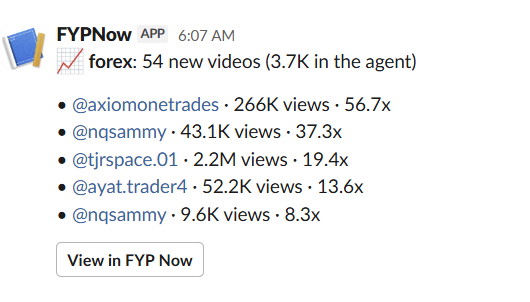
This is what a Viral Content Agent update looks like in Slack: the Agent's new videos after a refresh, with the top five ranked by views against each creator's followers.
Connect Discord
- In Discord, open the channel's settings → Integrations → Webhooks → New Webhook → Copy Webhook URL.
- In fypnow, go to Settings → Integrations → Discord, paste the URL, choose your alerts and press Add.
- Press Send test.
Messages post as “FYP Now” with mentions switched off, so an alert can never ping @everyone.
Connect a webhook (n8n, Zapier, Make or your own server)
- Create an HTTPS address that accepts a
POSTwith a JSON body (recipes below). - Go to Settings → Integrations → Webhook, paste the URL, choose your alerts and press Add.
- Copy the signing secret (it starts
whsec_). It's shown once; New secret replaces it, and the old one stops working straight away. - Press Send test.
The URL must start with https:// and be reachable on the public internet: addresses on a private network, localhost and internal names are refused. Use port 443 or a port from 1024 up.
n8n
Download our ready-made n8n workflow and import it (in a new workflow: the … menu → Import from File). It verifies each alert's signature, drops anything forged or older than five minutes, and outputs a ready-to-send message plus the raw data. Paste your signing secret into its Code node, activate the workflow, and add its Production URL in fypnow as a webhook. Then replace the last node with WhatsApp, Notion, Gmail, Google Sheets, Telegram or anything else n8n connects to, using {{ $json.message }} as the text.
NODE_FUNCTION_ALLOW_BUILTIN=crypto. WhatsApp also needs a Meta Business account and, outside a 24-hour conversation, an approved message template.Zapier
Create a Zap with the trigger Webhooks by Zapier → Catch Hook (a paid Zapier plan), paste the hook URL into fypnow as a webhook, press Send test, then Test trigger in Zapier to load the sample. Add a Filter on event and your actions. Catch Hook can't check the signature, so keep the hook URL private, or use Catch Raw Hook with a Code by Zapier step running the check below.
Make
Add a Webhooks → Custom webhook module, copy its address into fypnow as a webhook and press Send test; Make learns the data structure from it. Add a Router filtered on event. Treat the address as a secret.
What a webhook receives
POST <your URL>
Content-Type: application/json
X-FYPNow-Event: breakout.detected
X-FYPNow-Delivery: 3f6c0e1e-...
X-FYPNow-Signature: t=1760000000,v1=5b1f...

{
  "id": "9d1b6c1e-...",
  "event": "breakout.detected",
  "created_at": "2026-10-09T09:02:11+00:00",
  "organization_id": "c0ffee00-...",
  "data": {
    "username": "fitpro_mike",
    "video_url": "https://www.tiktok.com/@fitpro_mike/video/7647986126153682198",
    "multiplier": 15.2,
    "views": 2100000,
    "baseline_views": 138000,
    "prev_views": 600000,
    "is_own": false,
    "dashboard_url": "https://fypnow.com/video?id=7647986126153682198"
  }
}breakout.detected—username,video_url,multiplier,views,baseline_views(the creator's usual),prev_views(null when there's no earlier reading),is_own,post_format,dashboard_url.niche.refreshed—niche_name,new_videos,catalog_total(can be null), andtop: up to five videos withusername,video_url,views,multiplier.analysis.completed—video_id,username(null for an upload),platform,source(on_demand,uploadorreanalysis),hook_type,content_type,niche,highlights,video_url,dashboard_url.creator.posted—username,video_url,posted_at,description,viewsandlikesso far,is_own,dashboard_url.test.ping— sent only by Send test.
Fields can be null when we don't have the value; handle missing values rather than assuming every field is filled.
Verifying the signature
Every webhook carries X-FYPNow-Signature: t=<unix seconds>,v1=<hex>, where v1 is an HMAC-SHA256 of <t>.<raw body> keyed with your signing secret. Check it against the raw body, before parsing the JSON, and reject timestamps older than five minutes.
import crypto from 'node:crypto'

// rawBody: the request body exactly as received (a string), before JSON parsing
export function verify(rawBody, header, secret) {
  if (!header) return false
  const parts = Object.fromEntries(header.split(',').map((p) => p.split('=')))
  const expected = crypto.createHmac('sha256', secret)
    .update(`${parts.t}.${rawBody}`).digest('hex')
  const fresh = Math.abs(Date.now() / 1000 - Number(parts.t)) < 300
  return fresh && expected.length === parts.v1?.length &&
    crypto.timingSafeEqual(Buffer.from(expected), Buffer.from(parts.v1))
}
import hashlib, hmac, time
def verify(raw_body: bytes, header: str, secret: str) -> bool:
if not header or 't=' not in header:
return False
parts = dict(p.split('=', 1) for p in header.split(','))
expected = hmac.new(secret.encode(), f"{parts['t']}.".encode() + raw_body,
hashlib.sha256).hexdigest()
fresh = abs(time.time() - int(parts['t'])) < 300
return fresh and hmac.compare_digest(expected, parts.get('v1', ''))Delivery, retries and troubleshooting
- Alerts usually arrive within a minute or two. Each destination gets at most three a minute, so a burst arrives over a few minutes.
- Your server should answer with any 2xx within five seconds. Anything else is retried, five attempts in total over about two and a half hours. Redirects aren't followed.
- Delivery is at-least-once: on rare occasions the same alert arrives twice. De-duplicate on the body's
id. - If a destination is deleted (the Slack app removed, the Discord webhook deleted, or your server answering
410) or ten alerts in a row fail, the integration turns itself off and Settings shows why. Fix it, press Send test, then Turn on. - Recent alerts on each integration shows the latest sends and any error.
- Getting a test but no breakouts? Check the integration includes breakouts, that the breakout-size filter isn't higher than your breakouts, and that you track at least one creator.